

Requirements span many departments
Administration, finance, IT, human resources, public works, public safety and health departments may each follow different sources.
Monitor the federal, state and local requirements, grant conditions, accessibility rules, cybersecurity guidance and operational sources your county selects. When something changes, Rixena helps teams understand what changed, what may be affected and what to review next.
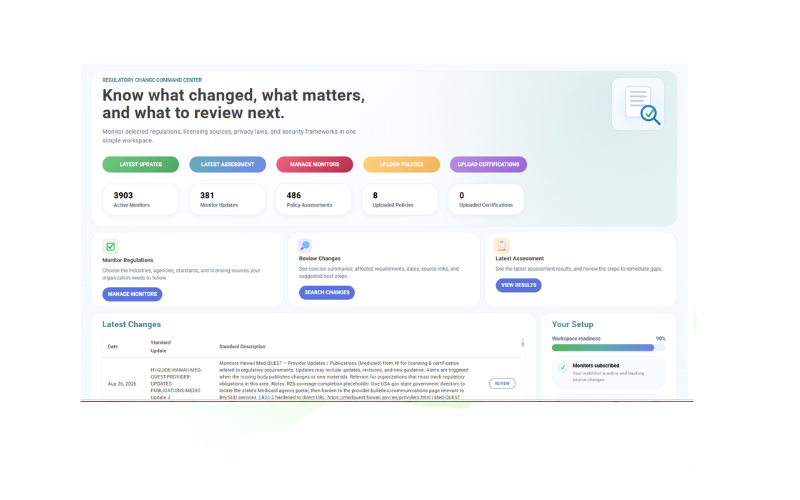
County obligations can come from federal agencies, state legislatures and regulators, grant programs, courts, local codes and operational guidance. Rixena brings the sources your teams select into a consistent monitoring and review process.
Administration, finance, IT, human resources, public works, public safety and health departments may each follow different sources.
A single program can involve state law, federal award terms, agency guidance, local policy and department-specific procedures.
County policies and procedures are often maintained by different offices, making coordinated review and evidence collection difficult.
Raw notices and bulletins do not always show effective dates, affected topics, source links or the teams that should review them.
Select the jurisdictions, agencies, programs and requirements that matter to each department. Expand or adjust coverage as services, funding and responsibilities change.
Selected state statutes, administrative rules, public records and open meetings requirements, elections materials and other governance sources.
2 CFR Part 200 materials, agency award conditions, procurement standards, grant administration updates and audit-related guidance.
ADA Title II requirements, web and mobile accessibility materials, and selected civil rights obligations tied to programs or funding.
CISA and selected state cybersecurity guidance, breach and privacy requirements, records management sources and department-specific information rules.
Public-agency labor requirements, selected occupational safety sources, FEMA and DHS materials, and emergency preparedness guidance.
EPA drinking water, stormwater, wastewater and solid waste sources, plus selected transportation, public works and infrastructure requirements.
Monitor availability and applicability vary by source, jurisdiction, department and county. Your team chooses the watchlist it wants Rixena to follow.
Select your monitors, receive organized change intelligence and optionally connect policies for gap assessment.
Choose the agencies, regulations, grant programs, standards, guidance sources and jurisdictions relevant to county operations.
See what changed, important dates, affected topics, source links and suggested review areas.
Upload and assign county policies, procedures or standards to selected monitors when useful.
Review potential gaps, ownership, next steps, review activity and supporting evidence in a consistent workflow.
Rixena follows the rule, bulletin, grant notice, manual or guidance source your team selects.
The update is captured, summarized and organized so reviewers can focus on what changed.
Your team receives a focused review package instead of another unstructured alert.
Rixena can support county teams with different responsibilities, funding conditions, systems and jurisdictional requirements—without forcing every department into the same watchlist.
Create your free monitoring accountReduce repeated searches across agency, legislative, program and guidance websites.
Give department owners the source, dates, affected topics and review context in one place.
Connect selected requirements with county policies, procedures and operating standards.
Keep change summaries, assessments, ownership, review activity and supporting evidence organized.
Start with selected-source monitoring, then add policy assessment workflows when departments are ready.
Request a DemoCounty teams can select applicable federal, state and local sources, including public records and open meetings requirements, federal award and procurement guidance, ADA Title II accessibility materials, cybersecurity guidance, workforce rules, emergency management sources and environmental or infrastructure requirements. Available coverage depends on the selected monitors and sources.
Yes. County administration, finance, information technology, human resources, public works, health and human services, public safety and other departments can organize monitoring around the sources and jurisdictions relevant to their responsibilities.
Yes. Rixena can be used for regulatory monitoring and change summaries without policy uploads. Policy uploads are optional and support policy assessment workflows when useful.
Your team can assign uploaded policies, procedures or standards to selected monitors. When a monitored source changes, Rixena can identify areas that may require review, clarification or remediation.
No. Your county determines applicability with its legal, compliance and subject-matter professionals. Rixena provides regulatory intelligence and workflow support and does not provide legal advice.
Create a free Rixena account and begin building watchlists for the departments and sources your county selects.